


£130.00
Ex Vat
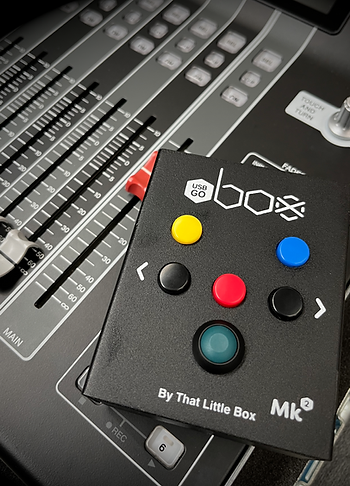
USB GO BOX Mk2 is a compact, rugged, dual-USB-C show controller built for reliable playback control in live environments.
With six tactile buttons and two independent USB connections, it can drive a main and backup computer simultaneously, keeping both machines in sync from a single press.
The USB GO BOX Mk2 is plug-and-play on macOS and Windows (no drivers required) and adds major flexibility via the GO BOX Control Panel, including powerful Learn and Companion workflows for custom control.
-
Dual USB-C outputs for true redundant control (main + backup in sync)
-
6-button hardware remote for show-critical transport and navigation
-
Plug and play on Mac & Windows — no drivers needed
-
MSC mode for immediate compatibility with QLab and other MSC-capable software
-
Program Change & Learn modes for fully user-defined MIDI mapping
-
Companion Mode for Bitfocus Companion integration (OSC, keystrokes/HID, app control, and more via Companion modules)
-
Rugged metal enclosure designed for touring and install use
The USB GO BOX Mk2 appears as a standard USB MIDI device in your software, ready to patch and map in seconds—while also offering advanced configuration options when you need them.
USB GO BOX Mk2 can be used as a dedicated hardware controller for QLab. In MSC mode, it provides straightforward playback control without requiring drivers or custom programming.
More Info
Reliability is everything in show control. Production teams invest heavily in redundancy so the show can survive a computer failure, a software crash, or a last-minute change, yet the entire system still comes down to a single press. The USB GO BOX Mk2 is built for that moment: a simple, rugged, six-button controller designed so that when you press GO, it goes—every time.
Mk2 retains the proven, tour-ready metal hardware of the original USB GO BOX and improves the workflow in the places that matter. With two independent USB-C connections, you can control a main and backup playback machine simultaneously, keeping both systems in sync from a single button press. This is true redundant control without extra MIDI interfaces, without drivers, and without complicated routing. Plug it into macOS or Windows and it appears immediately as a standard device, ready to patch into your software in seconds.
The USB GO BOX Mk2 is also significantly more flexible than the Mk1. MSC mode provides immediate compatibility with MSC-capable software—most notably as a plug-and-play solution for QLab. Program Change mode is ideal when you want the destination software to decide what each button does, giving you a straightforward, definable command set for systems that prefer mapping at the application end. For deeper customisation, Learn mode allows you to program each button to output musical MIDI messages of your choice, supporting workflows that require specific notes or controller-style messaging. Learn mode behaves like a musical instrument: when using MIDI notes, the GO BOX Mk2 sends Note On on press and Note Off on release for predictable, professional behaviour.
Mk2 also introduces a powerful expansion path with Companion Mode. In this mode, the GO BOX Mk2 works with Bitfocus Companion (via the USB GO BOX Mk2 Companion module) to trigger far more than MIDI, opening up control of OSC devices, HID/keystrokes, application control, and practically anything that has a Companion module available. The module exposes both button down and button up events, enabling clean press/release logic and more advanced triggers when you need them.
The new GO BOX Control Panel application (macOS and Windows) makes configuration fast and transparent. Connect your GO BOX Mk2 via USB 1 (the port closest to the Status LED) to view the current device state, change operating modes (including the only supported way to enter Companion Mode), enable Rapid Mode, and fine-tune debounce timing, with separate debounce for press and scroll so GO operation can remain safe while NEXT/LAST navigation stays smooth. You can also edit per-button Learn assignments from a single screen, apply settings to the device, and perform a factory reset when required.
Need something specific? If your workflow requires bespoke behaviour, alternate defaults, custom command sets, or integration advice for a particular playback/control environment, get in touch before purchase and we’ll point you to the best approach.
For full technical details, download the user manual, or contact us via the website if you’d like help choosing the right mode for your software and setup.


